Photo to Sketch & Art Filters Online
Convert photos into pencil sketches, line art, charcoal, pixel art, and pop art on your device.
- Never uploaded
- No sign-up
- No watermark
- Unlimited
- Works offline
Drag and drop your photos or a folder. or
Up to 100 MB each
Your photos never leave your device. Read the privacy policy.
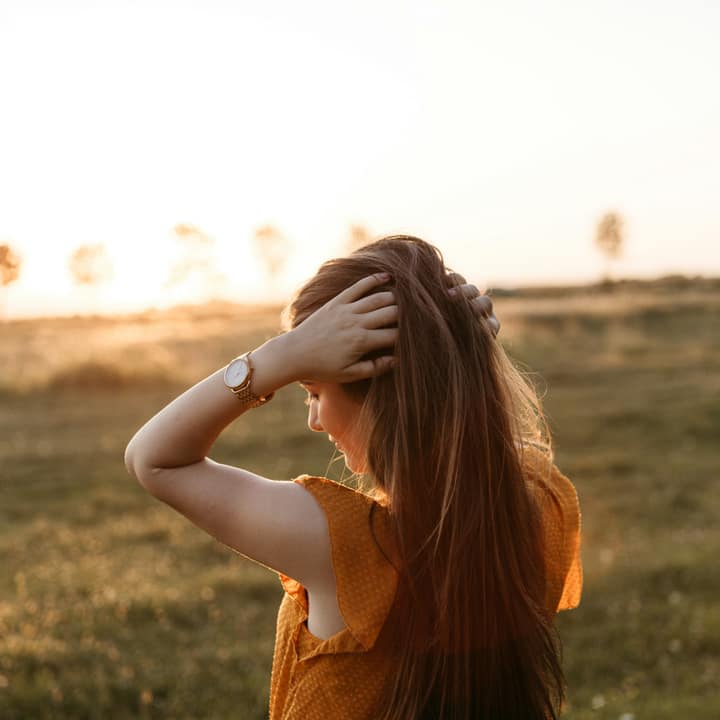
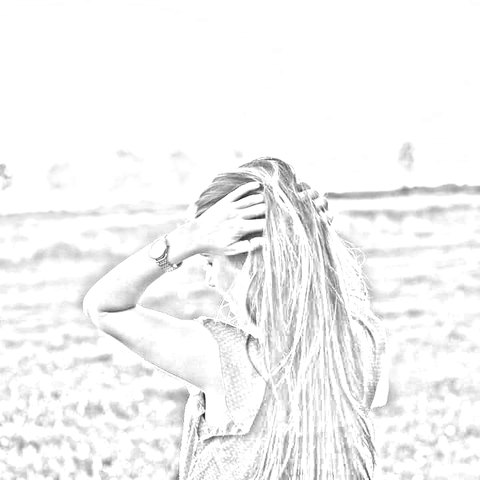
How to convert photos to sketch and artistic filters
Choose your photos
Select a single picture or a batch of up to 50 images in JPG, PNG, WebP, or AVIF format.
Select an artistic look
Pick from 10 styles like Pencil Sketch, Line Art, Charcoal, or Pop Art, and adjust sliders.
Export single photo or ZIP
Save your high-resolution artwork instantly or download the entire batch as an organized ZIP archive.
10 Distinct artistic looks
Turn pictures into graphite sketches, stark ink lines, velvety charcoal, 8-bit arcade pixels, or screenprint pop art.
Batch processing up to 50 photos
Process dozens of photos simultaneously with live progress reporting and instant streaming ZIP packaging.
100% Private local execution
Mathematical edge filters and color transforms run entirely in browser memory without sending files over the network.
What is Photo to Sketch & Art Filters?
Photo to Sketch & Art Filters transforms your digital photographs into handcrafted artistic mediums directly in your web browser. Offering 10 distinctive artistic aesthetics—Pencil Sketch, Line Art, Charcoal, Pixel Art, Pop Art, Vintage Film, Polaroid Frame, Neon Glow, Halftone Dots, and Duotone—each effect features 1 to 2 adjusting sliders for tailored intensity and detail. The tool supports real-time interactive previews, instant hold-to-compare verification, full-resolution master exports, and high-speed batch processing for up to 50 photos packaged into a clean ZIP archive with zero cloud uploads.
What happens to your photo
Four-step on-device pipeline from intake to final encoding without server roundtrips.
Intake
Decodes source images in browser memory with orientation correction and safe memory guardrails.
Analyze
Calculates directional luminance gradients, Sobel edge vectors, and color quantization tables.
Transform
Renders artistic line weights, crosshatching, dot matrices, and posterization bands in local memory.
Package
Generates full-resolution image outputs or streams batch results into a single compressed ZIP archive.
Zero network transmission
Your portraits, personal photos, and creative assets never leave your computer or phone.
Instant hold-to-compare
Press and hold the canvas or toggle compare mode to view the untouched original photo.
Batch up to 50 photos
Queue entire photo albums or asset folders and apply your preferred artistic look in seconds.
Automatic ZIP archiving
Batch results are automatically packaged into a clean, organized ZIP file using streaming fflate compression.
1-2 Sliders per style
Adjust stroke detail, line weight, charcoal density, or block sizes with intuitive controls.
Full-resolution rendering
Every filter computes at full native camera resolution during final export for crisp print quality.
Read the full guide
Transforming everyday photographs into expressive artistic illustrations has historically required hours of manual digital painting or expensive desktop illustration suites. Glowpixel Labs Photo to Sketch & Art Filters gives you instantaneous, studio-grade artistic transformations directly in your browser. Whether you want to turn a portrait into a fine pencil sketch, convert a pet photo into Warhol-style pop art, or render a city landscape as retro 8-bit arcade graphics, everything executes locally on your device in seconds.
10 Handcrafted Artistic Looks
Rather than applying simple superficial color washes, our engine analyzes directional luminance gradients, high-frequency spatial frequencies, and tonal distributions to simulate real-world physical artistic mediums:
- Pencil Sketch: Recreates the delicate texture and tonal gradations of a graphite pencil on fine-tooth paper. Sobel edge kernels detect contour boundaries, while adaptive luminance thresholds draw crosshatching strokes in darker shadow areas. Adjust line darkness and stroke detail sliders to move between a soft preliminary pencil drawing and a defined finished graphite illustration.
- Line Art: Generates clean, stark graphic ink line contours on crisp paper white. By calculating edge gradient vectors and applying binary thresholding, this look eliminates gray midtones to leave sharp black ink contours. It is the ideal tool for crafters creating laser engraving templates, vinyl cutting paths, tattoo flash sheets, and printable coloring book outlines.
- Charcoal: Simulates the velvety, smudged shadows and rich textural depth of vine charcoal on heavy cotton rag paper. Non-linear power curves deepen darks, while edge convolutions carve out bold, expressive charcoal strokes.
- Pixel Art: Channels the nostalgic charm of classic 8-bit and 16-bit retro arcade gaming. Unlike simple blur-mosaic tools, this engine groups pixels into chunky square blocks and quantizes color channels into restricted vintage video game palettes.
- Pop Art: Inspired by Andy Warhol’s iconic screenprinted masterworks, this look posterizes image luminance into four discrete tonal bands and replaces natural tones with hyper-saturated electric inks—including hot magenta, electric cyan, vibrant tangerine, and neon yellow.
- Vintage Film: Captures the warmth, relaxed contrast, and faded nostalgia of 1970s analog color print film. Shadows are gently lifted with a subtle cyan-green tint, highlights are bathed in golden amber warmth, and corners receive a gentle optical vignette falloff.
- Polaroid Frame: Recreates the distinctive magic of vintage instant cameras. The photograph is treated with faded cyan shadows and warm highlights, surrounded by the iconic white instant border with its signature wide bottom chin.
- Neon Glow: Electrifies high-contrast edges with luminous, pulsating cyberpunk light trails and glowing neon auras.
- Halftone Dots: Recreates the classic offset printing screening used in vintage comic books and newspaper presses. Image tones are rendered through a matrix of discrete ink dots that vary in pitch and size.
- Duotone: Maps image shadows and highlights across custom two-tone gradient pairs, echoing the bold, modern graphic aesthetic popularized by Spotify album art and editorial design.
High-Speed Batch Processing & ZIP Export
Need to stylize an entire photo album or prepare a collection of art prints? The engine handles batches of up to 50 photos simultaneously. Select multiple files or drop an entire folder into the workspace. The engine processes each file locally at 100% full camera resolution with real-time progress tracking, then bundles the entire set into a single compressed glowpixel-art-photos.zip archive using high-speed streaming fflate compression.
Uncompromising Privacy & Performance
Every filter algorithm, convolution pass, and color quantization routine runs 100% client-side in browser memory. No photographs are ever uploaded to remote servers or third-party AI models. Enjoy complete creative freedom with zero cloud latency, no subscription paywalls, and guaranteed privacy.
How it compares
How Photo to Sketch & Art Filters compares with server-based tools and desktop software.
| Feature | Glowpixel Art Filters | Cloud AI Filter Apps | Desktop Graphic Suites |
|---|---|---|---|
| Privacy & Security | 100% On-device, 0 bytes sent | Images uploaded to cloud servers | Local, but requires paid software |
| Batch Processing | Up to 50 photos with ZIP archive | Single image only or rate-limited | Batch actions require scripting |
| Processing Speed | Real-time client-side rendering | Queued server rendering delays | Fast, but heavy memory footprint |
| Cost & Sign-Up | Free, no account, no watermark | Subscription or credit-based | Expensive upfront license |
| Resolution Limits | Native full camera resolution | Frequently downscaled for free tier | Full resolution |
Who uses it
Built for photographers, designers, developers, and privacy-conscious teams.
Artists & Illustrators
Extract base line art and graphite sketches from photo references to jumpstart digital paintings and comic book layouts.
Gamers & Pixel Art Creators
Convert real-world textures and character photos into stylized 8-bit retro arcade sprites and profile pictures.
Printmakers & Crafters
Generate high-contrast line drawings for laser etching, Cricut vinyl cutting, screenprinting, and coloring book pages.
Discover more
Preset sizes and formats
- Add Caption to Image Online Free: Top & Bottom Text
- Add Logo Watermark to Photo Online Free
- Add Text to Photo Online: Free Text Overlay Tool
- Add Text Watermark to Photo Online Free
- App Icon Generator for Web & Mobile PWAs
- Apple Touch Icon Generator Online Free
- Extract Arabic Text from an Image
- Convert AVIF to JPG
- Convert AVIF to PNG
- Convert Photo to Black and White
- Blur Face in Photo Free
- Blur License Plate in Car Photos
- Brighten Image Online: Lighten Dark Photos
- Censor Part of an Image Free
- Change Image Background to White
- Image Color Picker Online with Eyedropper
- Combine Photos Side by Side Online Free
- Compress AVIF
- Compress to 100KB
- Compress to 1MB
- Compress to 200KB
- Compress to 20KB
- Compress to 500KB
- Compress to 50KB
- Compress JPG
- Compress PNG
- Compress WEBP
- Convert Receipt to PDF
- Crop Image to 16:9 Widescreen
- Crop Image to 9:16 Vertical Ratio
- Crop Image to Circle Online Free
- Crop Image to Square
- Enlarge Images Without Losing Quality
- Extract Colors from Image Free
- Extract Text from an Image On Device
- Flip Image Horizontally or Vertically
- French Image to Text OCR
- Glow Effect Photo Editor
- Convert HEIC to JPG
- Convert HEIC to PDF
- Convert HEIC to PNG
- Convert HEIC to WebP
- Find Hex Code from Image Free
- Image Color Palette Generator Free
- Improve Image Quality Online with AI
- Increase Image Contrast
- Increase Image Resolution Online with AI
- Free Instagram Grid Splitter: 3x3 & 3x1 Tiles
- Convert JPG to ICO Favicon
- Convert JPG to PDF
- Convert JPG to PNG
- Convert JPG Photos to Editable Text
- Convert JPG to WebP
- Make a Meme Online Free: Custom Meme Maker
- Make Image Background Transparent in Browser
- Meme Caption Maker: Heavy Impact Typography
- Merge Images into PDF
- Passport Photo Background Remover Privately
- Free Photo Collage Maker: Multi-Photo Layouts
- Photo Filters Online: 8 One-Tap Looks
- Photo to Pencil Drawing: Realistic Sketch Filter
- Photo to Sketch Converter
- Pixel Art Converter: 8-Bit Retro Art
- Pixelate Image Online Free
- Convert PNG to AVIF
- Convert PNG to ICO Online Free
- Convert PNG to JPG
- Convert PNG to PDF
- Convert PNG to WebP
- Pop Art Photo Filter: Andy Warhol Style
- Product Photo Background Remover & Touch-up
- Remove Background from Image Online Privately
- Remove EXIF Data from JPG Files
- Remove EXIF and Metadata from PNG
- Remove GPS Location from Photos
- Remove Metadata from an Image
- Remove White Background from Images Privately
- Resize Image for Facebook Cover
- Resize Image for Instagram Feed
- Resize Image for Instagram Story
- Resize Image for YouTube Thumbnail
- Resize images by exact pixels
- Resize images to passport photo size
- Rotate Image Left or Right
- Turn a Scanned Image into Text
- Convert a Screenshot to Text Privately
- Sharpen Image Online: Fix Blurry Photos
- Spanish Image to Text OCR
- Split Image into Parts Online: Slices & Tiles
- Tiled Watermark on Image Online Free
- Upscale Images 4x with On-Device AI Super-Resolution
- View EXIF Data in a Photo
- Watermark Multiple Images in Batch
- Convert WebP to JPG
- Convert WebP to PDF
- Convert WebP to PNG
Upcoming image tools
Questions, answered
Common questions about formats, privacy, performance, and offline capabilities.
What artistic filter styles are available?
The tool includes 10 complete styles: Pencil Sketch, Line Art, Charcoal, Pixel Art, Pop Art, Vintage Film, Polaroid Frame, Neon Glow, Halftone Dots, and Duotone.
How does the batch conversion work?
You can select up to 50 photos simultaneously. The engine processes each file locally at full resolution and bundles all output images into a single downloadable ZIP archive.
Are my photos uploaded to any server or AI model?
No. All edge detection, crosshatching, pixel quantization, and color mapping algorithms run strictly client-side inside your browser. No files are ever uploaded or stored externally.
What is the difference between Pencil Sketch and Line Art?
Pencil Sketch simulates the organic tonal shading and delicate graphite hatching of a pencil drawing on paper. Line Art produces stark, clean binary ink contours with high graphic contrast, ideal for stencils, engravings, and coloring pages.
Can I adjust the strength of the art filters?
Yes. Every artistic style features 1 to 2 dedicated sliders that let you dial in line thickness, threshold sensitivity, charcoal smudge density, or block sizes to achieve the exact look you want.
What file formats can I convert and download?
You can input JPG, PNG, WebP, AVIF, and HEIC photos. The tool exports high-resolution JPG or PNG files, matching transparency if present.
Does the Polaroid Frame filter shrink or crop my photo?
No. The Polaroid Frame filter applies a classic instant film color grade and layers the authentic white border with characteristic bottom chin over the photo frame without altering file dimensions.
How does the Pixel Art filter differ from regular pixelation?
Standard pixelation simply averages colors into square tiles. Our Pixel Art filter pairs block reduction with retro color palette quantization, recreating the authentic look of 8-bit and 16-bit arcade video games.
Can I compare the filtered art with my original photo?
Yes. Click and hold the Compare button, or press and hold directly on the preview canvas with your mouse or finger, to view the original unedited photograph instantly.
Is there a file size limit for uploaded photos?
You can process individual images up to 100 MB each. Safe memory guardrails protect your browser from crashing when handling large multi-megapixel smartphone captures.
Related tools
Complementary image tools running 100% in your browser.
Last updated: