Photo to Sketch Converter Online
Turn photos into realistic pencil sketches and graphite drawings directly on your device.
- Never uploaded
- No sign-up
- No watermark
- Unlimited
- Works offline
Drag and drop your photos or a folder. or
Up to 100 MB each
Your photos never leave your device. Read the privacy policy.
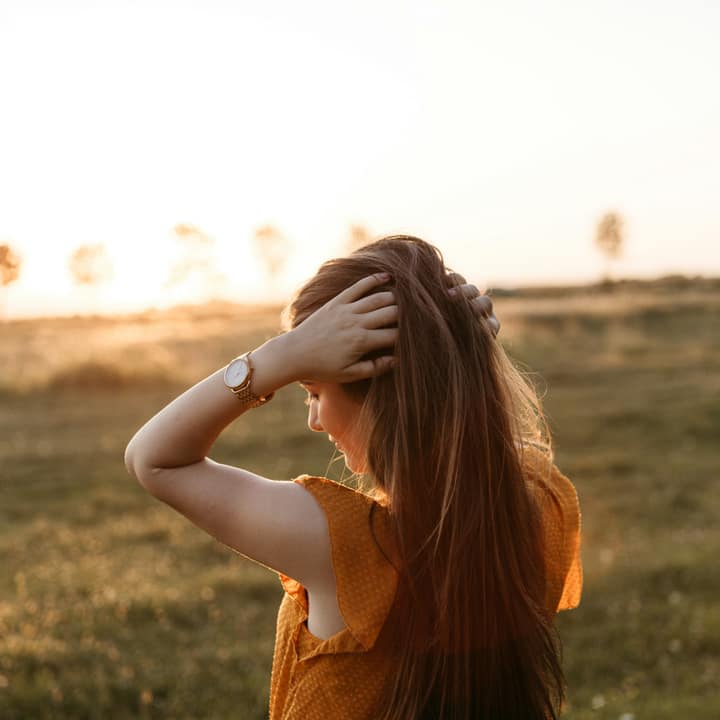
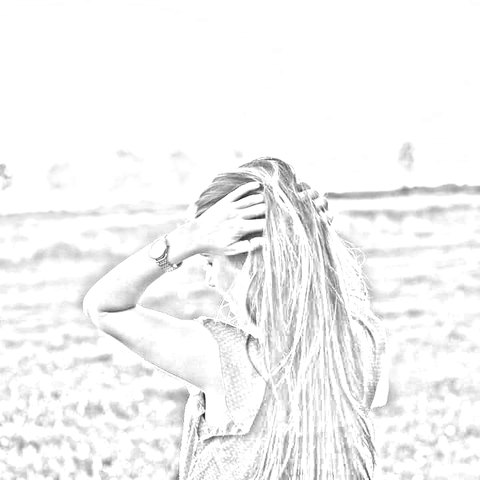
How to convert photos to sketch and artistic filters
Choose your photos
Select a single picture or a batch of up to 50 images in JPG, PNG, WebP, or AVIF format.
Select an artistic look
Pick from 10 styles like Pencil Sketch, Line Art, Charcoal, or Pop Art, and adjust sliders.
Export single photo or ZIP
Save your high-resolution artwork instantly or download the entire batch as an organized ZIP archive.
10 Distinct artistic looks
Turn pictures into graphite sketches, stark ink lines, velvety charcoal, 8-bit arcade pixels, or screenprint pop art.
Batch processing up to 50 photos
Process dozens of photos simultaneously with live progress reporting and instant streaming ZIP packaging.
100% Private local execution
Mathematical edge filters and color transforms run entirely in browser memory without sending files over the network.
What is Photo to Sketch & Art Filters?
Photo to Sketch converts photographs into realistic pencil sketches and hand-drawn graphite illustrations directly in your web browser. Using edge detection algorithms that simulate graphite lines on textured paper, it renders organic contours and shading in real time with batch export support for up to 50 photos without server uploads.
What happens to your photo
Four-step on-device pipeline from intake to final encoding without server roundtrips.
Intake
Decodes source images in browser memory with orientation correction and safe memory guardrails.
Analyze
Calculates directional luminance gradients, Sobel edge vectors, and color quantization tables.
Transform
Renders artistic line weights, crosshatching, dot matrices, and posterization bands in local memory.
Package
Generates full-resolution image outputs or streams batch results into a single compressed ZIP archive.
Zero network transmission
Your portraits, personal photos, and creative assets never leave your computer or phone.
Instant hold-to-compare
Press and hold the canvas or toggle compare mode to view the untouched original photo.
Batch up to 50 photos
Queue entire photo albums or asset folders and apply your preferred artistic look in seconds.
Automatic ZIP archiving
Batch results are automatically packaged into a clean, organized ZIP file using streaming fflate compression.
1-2 Sliders per style
Adjust stroke detail, line weight, charcoal density, or block sizes with intuitive controls.
Full-resolution rendering
Every filter computes at full native camera resolution during final export for crisp print quality.
Read the full guide
Hand-drawn pencil sketches have a timeless, organic warmth that digital photography cannot replicate. Transforming a personal portrait, pet picture, or architectural snapshot into a delicate graphite drawing creates thoughtful personalized gifts, social media avatars, and unique creative illustrations.
The configuration on this page optimizes Photo to Sketch & Art Filters specifically for converting photos to pencil sketches. Powered by client-side edge detection and organic graphite simulation, you can turn any picture into a realistic sketch in seconds right inside your browser.
How digital pencil sketching works
Unlike crude thresholding filters that simply turn photos into harsh black and white cutouts, our pencil sketch algorithm simulates the physical interaction between graphite lead and textured paper:
- Directional Sobel gradient analysis: The algorithm calculates horizontal and vertical luminance gradients across the image, identifying natural contour lines along facial features, jawlines, hair strands, and architectural edges.
- Noise floor calibration & ink capping: Real pencil drawings have subtle pressure variations. The engine applies an adaptive noise floor and capped ink limits so that even dark, grainy smartphone photos translate into clean, legible pencil lines on bright paper white without muddy black blobs.
- Continuous tone crosshatching: In shadow areas, the engine renders dense, overlapping pencil strokes that mirror the tonal shading an artist creates with angled pencil strokes.
Great creative uses for photo sketches
- Custom gifts and keepsakes: Convert family wedding portraits, graduation photos, or childhood snapshots into elegant pencil drawings that look beautiful framed on a wall or printed on custom greeting cards.
- Pet memorial portraits: Pet owners love seeing their dogs, cats, and horses rendered as delicate graphite illustrations, accentuating soulful eyes and fur textures.
- Architectural prints and home drawings: Turn house photos into architectural pencil renderings—a favorite gift from real estate agents to new homeowners at closing.
- Reference outlines for artists: Digital painters and watercolorists can convert reference photos into clean sketch outlines to use as foundational underdrawings on canvas or iPad illustration apps.
Batch conversion and local privacy
Have a collection of vacation photos or an entire family album you want to sketch? You can drag and drop up to 50 photos at once. The engine processes each file locally at full native resolution with live progress tracking, then packages all sketch artworks into an organized ZIP archive ready for instant download.
Throughout the process, your private photos never leave your computer or phone. Glowpixel Labs processes all pixels locally in your web browser with zero server uploads and no account requirements. Read our privacy policy to explore our client-side architecture.
Photos that turn into the best sketches
Sketch filters follow edges and tone, so pictures with clear light and shade give the most convincing drawings. A portrait lit from the side, a building in strong sun or a close-up of a plant all work well, while flat, foggy or very dark photos come out pale. Raise the strength slider until the main outlines appear, then lower the detail if the paper looks noisy. Try pencil for soft shading, line art for clean contours and charcoal for dramatic contrast. Export a larger size when you plan to print, because the filtered result can be saved at the full resolution of the original.
How it compares
How Photo to Sketch & Art Filters compares with server-based tools and desktop software.
| Feature | Glowpixel Art Filters | Cloud AI Filter Apps | Desktop Graphic Suites |
|---|---|---|---|
| Privacy & Security | 100% On-device, 0 bytes sent | Images uploaded to cloud servers | Local, but requires paid software |
| Batch Processing | Up to 50 photos with ZIP archive | Single image only or rate-limited | Batch actions require scripting |
| Processing Speed | Real-time client-side rendering | Queued server rendering delays | Fast, but heavy memory footprint |
| Cost & Sign-Up | Free, no account, no watermark | Subscription or credit-based | Expensive upfront license |
| Resolution Limits | Native full camera resolution | Frequently downscaled for free tier | Full resolution |
Who uses it
Built for photographers, designers, developers, and privacy-conscious teams.
Artists & Illustrators
Extract base line art and graphite sketches from photo references to jumpstart digital paintings and comic book layouts.
Gamers & Pixel Art Creators
Convert real-world textures and character photos into stylized 8-bit retro arcade sprites and profile pictures.
Printmakers & Crafters
Generate high-contrast line drawings for laser etching, Cricut vinyl cutting, screenprinting, and coloring book pages.
Discover more
Preset sizes and formats
- Add Caption to Image Online Free: Top & Bottom Text
- Add Logo Watermark to Photo Online Free
- Add Text to Photo Online: Free Text Overlay Tool
- Add Text Watermark to Photo Online Free
- App Icon Generator for Web & Mobile PWAs
- Apple Touch Icon Generator Online Free
- Extract Arabic Text from an Image
- Convert AVIF to JPG
- Convert AVIF to PNG
- Convert Photo to Black and White
- Blur Face in Photo Free
- Blur License Plate in Car Photos
- Brighten Image Online: Lighten Dark Photos
- Censor Part of an Image Free
- Change Image Background to White
- Image Color Picker Online with Eyedropper
- Combine Photos Side by Side Online Free
- Compress AVIF
- Compress to 100KB
- Compress to 1MB
- Compress to 200KB
- Compress to 20KB
- Compress to 500KB
- Compress to 50KB
- Compress JPG
- Compress PNG
- Compress WEBP
- Convert Receipt to PDF
- Crop Image to 16:9 Widescreen
- Crop Image to 9:16 Vertical Ratio
- Crop Image to Circle Online Free
- Crop Image to Square
- Enlarge Images Without Losing Quality
- Extract Colors from Image Free
- Extract Text from an Image On Device
- Flip Image Horizontally or Vertically
- French Image to Text OCR
- Glow Effect Photo Editor
- Convert HEIC to JPG
- Convert HEIC to PDF
- Convert HEIC to PNG
- Convert HEIC to WebP
- Find Hex Code from Image Free
- Image Color Palette Generator Free
- Improve Image Quality Online with AI
- Increase Image Contrast
- Increase Image Resolution Online with AI
- Free Instagram Grid Splitter: 3x3 & 3x1 Tiles
- Convert JPG to ICO Favicon
- Convert JPG to PDF
- Convert JPG to PNG
- Convert JPG Photos to Editable Text
- Convert JPG to WebP
- Make a Meme Online Free: Custom Meme Maker
- Make Image Background Transparent in Browser
- Meme Caption Maker: Heavy Impact Typography
- Merge Images into PDF
- Passport Photo Background Remover Privately
- Free Photo Collage Maker: Multi-Photo Layouts
- Photo Filters Online: 8 One-Tap Looks
- Photo to Pencil Drawing: Realistic Sketch Filter
- Photo to Sketch Converter
- Pixel Art Converter: 8-Bit Retro Art
- Pixelate Image Online Free
- Convert PNG to AVIF
- Convert PNG to ICO Online Free
- Convert PNG to JPG
- Convert PNG to PDF
- Convert PNG to WebP
- Pop Art Photo Filter: Andy Warhol Style
- Product Photo Background Remover & Touch-up
- Remove Background from Image Online Privately
- Remove EXIF Data from JPG Files
- Remove EXIF and Metadata from PNG
- Remove GPS Location from Photos
- Remove Metadata from an Image
- Remove White Background from Images Privately
- Resize Image for Facebook Cover
- Resize Image for Instagram Feed
- Resize Image for Instagram Story
- Resize Image for YouTube Thumbnail
- Resize images by exact pixels
- Resize images to passport photo size
- Rotate Image Left or Right
- Turn a Scanned Image into Text
- Convert a Screenshot to Text Privately
- Sharpen Image Online: Fix Blurry Photos
- Spanish Image to Text OCR
- Split Image into Parts Online: Slices & Tiles
- Tiled Watermark on Image Online Free
- Upscale Images 4x with On-Device AI Super-Resolution
- View EXIF Data in a Photo
- Watermark Multiple Images in Batch
- Convert WebP to JPG
- Convert WebP to PDF
- Convert WebP to PNG
Upcoming image tools
Questions, answered
Common questions about formats, privacy, performance, and offline capabilities.
What types of photos work best for the pencil sketch filter?
Portraits with good lighting, pet photos, architectural landmarks, and high-contrast landscape photos produce stunning sketch results. Clean subject outlines and varied lighting allow the sketch algorithm to render rich crosshatching and defined contours.
Can I adjust the darkness and detail of the sketch lines?
Yes. Use the Pencil Darkness slider to adjust stroke contrast from light preliminary sketching to deep graphite shading, and use the Stroke Detail slider to control fine contour sensitivity.
Can I convert multiple photos to sketches at the same time?
Yes. You can select up to 50 photos simultaneously. The tool converts each picture locally and packages all sketch artworks into a single organized ZIP archive.
Are my photos uploaded to an AI model or cloud server?
No. The pencil sketch conversion runs completely on your own device using local mathematical algorithms. Your private photographs are never uploaded or shared.
Related tools
Complementary image tools running 100% in your browser.
Last updated: